Responses overview
When your Expectations for your data fail, you may want to respond in a variety of ways depending on what the Expectation failure means for your business. For example, you might do one or more of the following:
- Let stakeholders know so they can avoid making decisions based on bad data.
- Engage collaborators so they can begin assessing and resolving the issue.
- Quarantine and backfill bad records.
GX Cloud provides the following to support these kinds of responses to results.
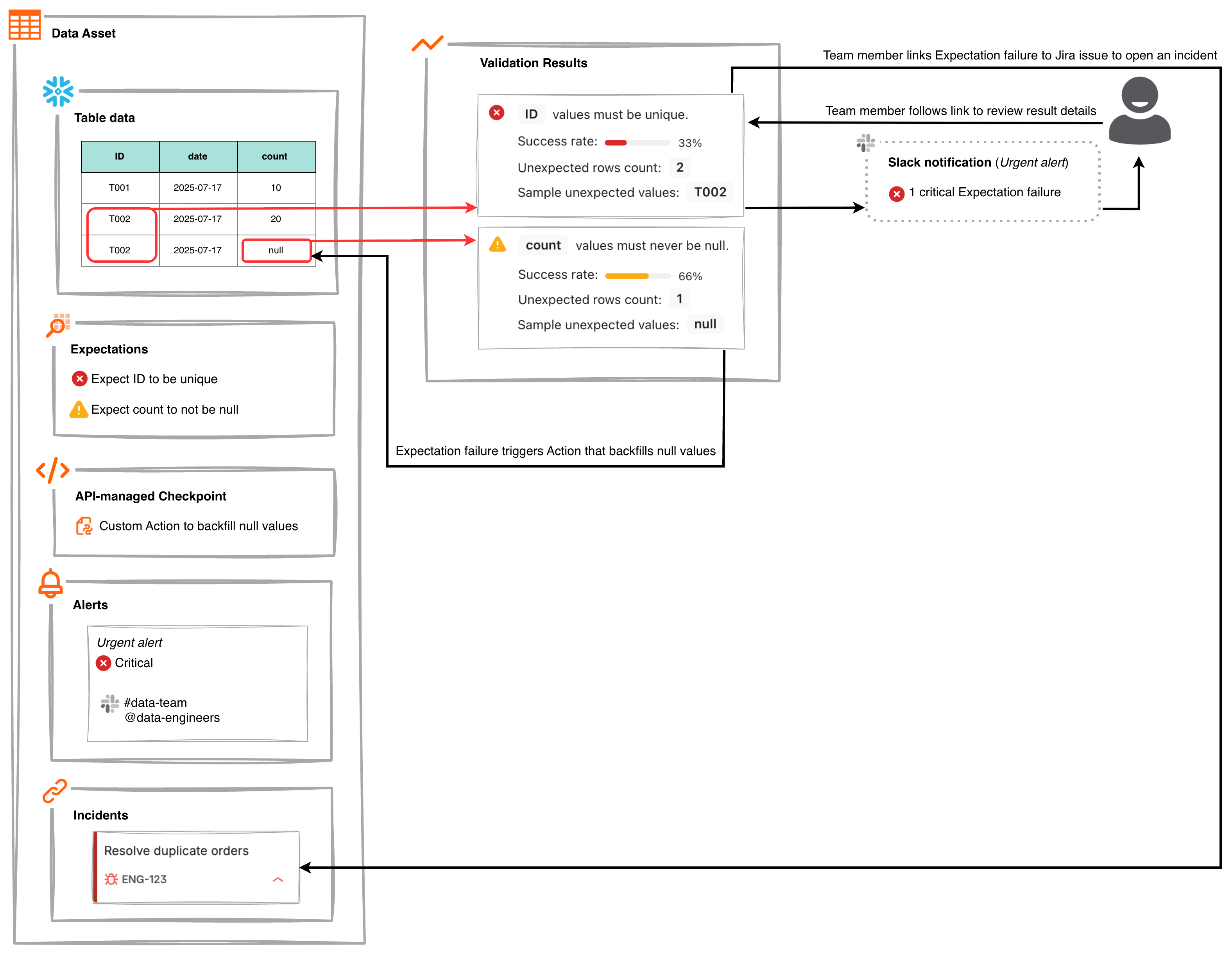
- Alerts: You can configure alerts to notify email addresses, Microsoft Teams channels, and Slack channels about Expectation failures as soon as they happen. The notifications provide high-level information about how many Expectations failed and include a link to detailed Validation Results.
- Incidents: You can link Expectation failures to Jira issues to triage, prioritize, assign, and track the resolution of data quality problems. Linked issues are made accessible at the Data Asset level and in Validation Results for visibility.
- Actions: You can programmatically apply custom business logic that does anything that can be done with Python code. For example, you might trigger different webhooks depending on which Expectations fail or run follow-up ETL jobs to fill in missing values.
Here’s an example of how an organization might use alerts, incidents, and Actions together to ensure data quality. Actions handle problems where the solution can be automated. Meanwhile, alerts and incidents help make sure the right people have the right info at the right time to address important problems that need human intervention.